# In-Game Usage
## In-Game Usage Guide for BlanketCobbleSpawners
### Placing a Spawner
1. **Get a Spawner**: Use the command `/cobblespawners givespawnerblock` to receive a custom Pokémon spawner item.
2. **Place the Spawner**: Right-click anywhere in the world to place the spawner at your desired location.
***
***
### Managing the Spawner
Once the spawner is placed, you can fully customize it in-game using the GUI. Right-click the spawner to access various settings.
#### Pokémon Selection
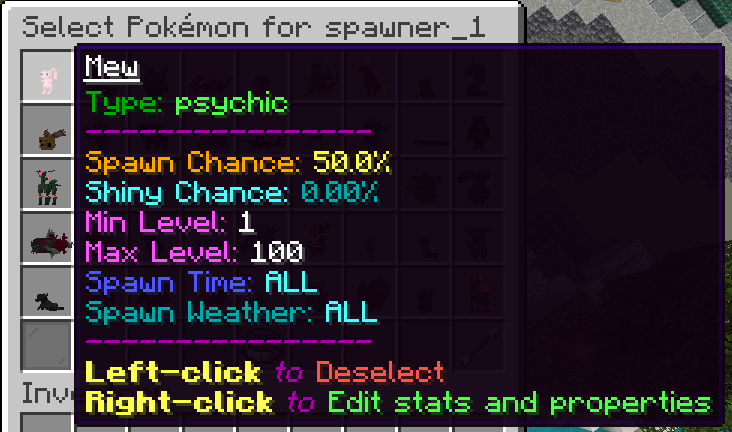
* **Right-click the spawner** to open the Pokémon selection GUI.
* Choose which Pokémon you want the spawner to spawn.
* You can configure:
* **Species** of Pokémon.
* **Spawn Ratios**: Adjust the percentage chance of each Pokémon spawning.
* **Shiny Chance**: Set the likelihood of spawning a shiny Pokémon.
* **Level Range**: Set the minimum and maximum level for the spawned Pokémon.
#### Editing IVs and EVs
* **IV Settings**: Right-click the spawner to open the settings menu and configure individual IVs (HP, Attack, Defense, etc.) for each spawned Pokémon.
* **EV Settings**: You can also customize the EVs that players will receive upon defeating spawned Pokémon.
#### Spawner Settings
* **Spawn Time**: Configure the time of day when the spawner is active (Day, Night, or All times).
* **Weather Conditions**: Set the required weather for the spawner to function (Clear, Rain, Thunder, or All).
* **Spawn Radius**: Adjust the spawn radius to control how far Pokémon will spawn from the spawner.
* **Spawn Limit**: Set a limit on the number of Pokémon that can be spawned at once.
***
***
### Additional Features
#### Spawner Visibility
* **Toggle Visibility**: You can hide or show the spawner in-game by toggling its visibility. This will hide the spawner block while still allowing it to function.
* Use `/cobblespawners togglevisibility [spawnerName]` to hide or reveal the spawner.
#### Particles (Disabled for now)
* **Toggle Particles**: Enable or disable particles around the spawner to visually indicate its presence.
***
### Managing and Reloading
* Use `/cobblespawners reload` to reload the spawner configurations without restarting the server.
* **Kill Spawned Pokémon**: Use `/cobblespawners killspawned [spawnerName]` to remove all Pokémon spawned by a specific spawner.
***
With this in-game GUI, managing spawners is intuitive and gives you full control over spawning behavior directly within Minecraft.